
Everyone’s writing setup looks different, and there’s no wrong way to do it. Mine is a little over the top, and I’m grateful for it. I literally picked my house based on the office and being able to set up two gaming stations for myself and Mr. Summers. Mine is just now multipurpose.
This is not the next write-up I intended to do, but this is where the brain wanted to go today while I pretend I care about whatever is happening in Zoom.
I see a lot of people on Threads asking for computer chair recommendations. I spend anywhere between eight to fourteen hours at my desk at least five days a week, and since I’m a wheelchair user, most of my time is spent sitting down anyway. In my day job, I get asked about my setup a lot because it looks comfortable, and I’m slowly converting everyone to Razer headsets. So I’m going to break down my setup for you all. Affiliate links to be found, but these are all products I’ve used for years and swear by.
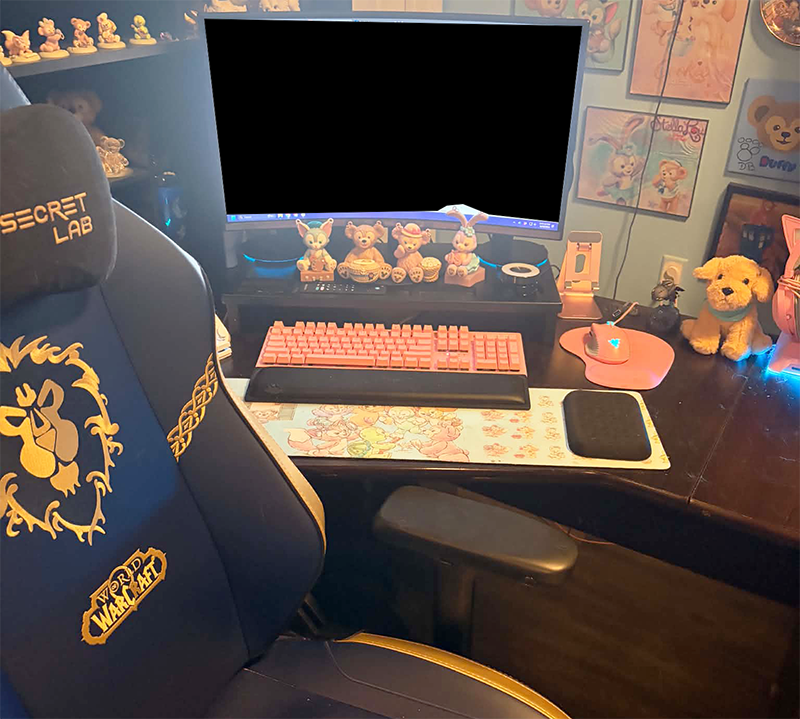
Computer Chair: I swear by SecretLab gaming chairs. I’d always wanted to get one for Mr. Summers, but I wasn’t going to spend $600 on a computer chair without testing it out first. We got lucky in 2022, and some friends we visited in New York had one. I ordered his a few weeks later and got one for myself the next year.
I’m heartbroken they’ve released Pokemon chairs and I’m stuck with my World of Warcraft one. (I got it to match his since there wasn’t a design I loved at the time. He’s Horde, I’m Alliance.) They do have Pokemon skins, which are chair covers, but of course Pikachu and Eevee only come as new chairs.
I have the base model with the most basic features. Mr. Summers has one of the lumbar pillows. I’ve stolen it a couple of times, but I don’t like it.
Desk: My desk is a massive L desk and I love it. When I tell you I picked my house to go with this desk, I’m not kidding. I’ve had it since 2018, and Office Depot is still selling it. Building it took like two days, and four of us to get the hutch on and get it into place. It’s been moved a couple of times now, and Mr. Summers has suggested we don’t move it anymore, but it’s hanging in there.
Computer: I’m a desktop girl. Bought an HP in early 2019 and she’s still going strong. Mr. Summers updated my graphics card, and I always run two external hard drives.
Monitor riser: Keeps my monitor at a more comfortable eye level, and it gives me a place to display some stuff and keep my phone handy.
Elbow Pads: Long days at the computer at a hard, wooden desk get uncomfortable, and the way I sit, I don’t really use the armrests on my chair. So I bought these nifty little pads for my desk. They are sticky so you can make them stay in one place, but I move them around constantly because I like to fidget. Seriously helpful for long word count days.
Desk Mat: Mine is a custom job from a company that is no longer in business, but you can find these most anywhere. I recommend for long desk days.
Mouse pad: This isn’t fancy, but most of my setup is pink, and I like the wrist pad.
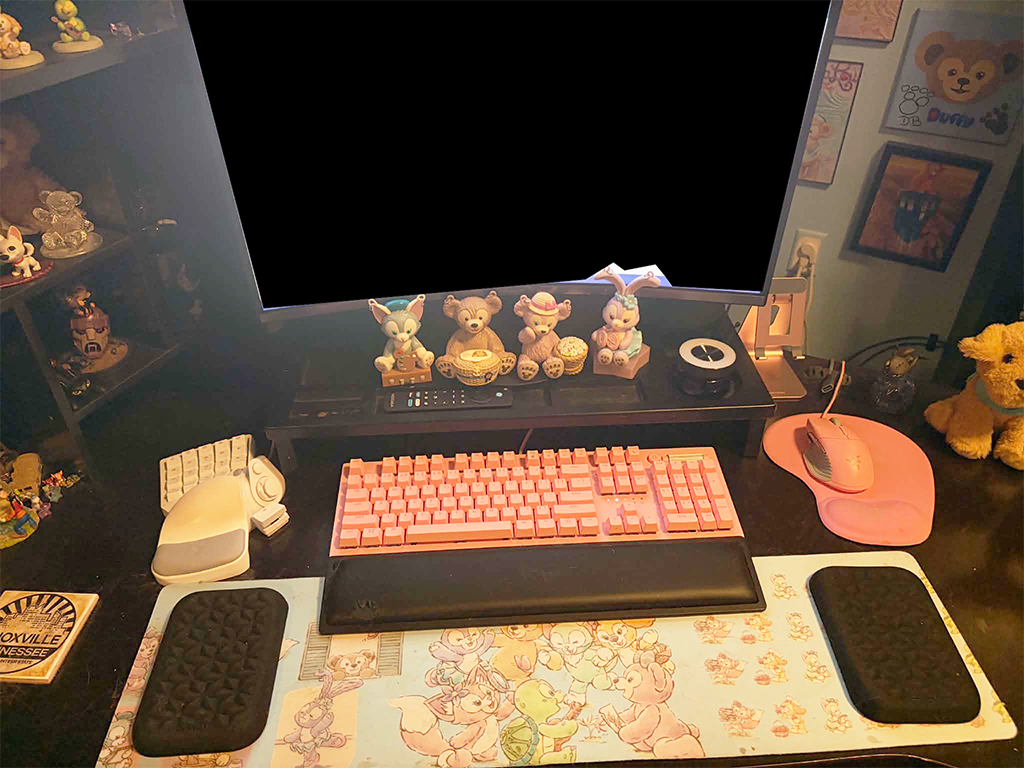
Now, welcome to the cult of Razer. Razer is a gaming technology company that my husband introduced me to. In late 2020, my ten-year-old monitor gave up the ghost and died. In an emergency trip to Best Buy to get me a new one, we wound up upgrading my entire setup. I’m not someone who has to have all matching equipment. (My stove, fridge, and dishwasher are all different brands, so this isn’t purely aesthetics.) But I like Razer’s products and how they interact.
Razer Black Widow Keyboard: I see how people like the clicky clacky keys. Let me tell you, the sounds this thing makes are SO SATISFYING. I’ve got the ripple effect going on the lights so wherever I type, I get a wave going out from it. It’s super fun.
It’s worth noting that the Black Widow comes with a plastic wrist rest. My husband had a Hunstman before Skipper killed it by spilling a soda on it. I stole the plush wrist rest from him because he doesn’t use them. I hate that it’s not pink, but it’s fine.
Razer Kraken Kitty Headset: Yes, my headphones have cat ears, and I use them for work. Great sound, super comfortable, and they light up.
Razer Basilisk Mouse: Yes, I use a wired mouse. I know in 2026, that sounds insane. But I don’t need batteries, and it never dies, and it works great. I like Razer mice because you can custom-program the buttons. So, I have a back button on my mouse for internet browsing; I have hotkeys in there for shortcuts. It’s great.
Razer Tartarus: Now, this is a device that is really meant only for gamers. It’s a twenty key pad that is set up to be the left side of your keyboard. Mr. Summers got it for me because trying to use WASD as arrow keys makes my hands hurt. Now you may wonder what this has to do with writing or work? Remember how I said Razer buttons are programmable like the mouse? I have three profiles for this device. One for Dreamlight Valley, one for World of Warcraft, and one is just a bunch of shortcuts. It was hurting my hands to press Ctrl+C and Ctrl+V a bunch when I was working on a big graphics project, so I made it where I only have to press one button. It’s so handy.
Razer Nommo Chromo: These actually used to be Mr. Summers’s. I would not have shelled out for them myself, but I do like that the lights sync up with everything else.
Razer Base Station: I have the older one, but basically it’s a USB dock that lights up with three extra ports, and it holds your headphones. Over the top? Probably, but I love it.
Razer Kiyo: Basic webcam. Since I’m on a desktop, I don’t have a built-in one. There are plenty of cheaper ones out there in the world, but it was easier to just get one that goes with everything else. The light on this thing is impressively bright.
And to tell you how far my Razer obsession goes, I use Mr. Summers’s old Razer Blade 15 laptop when I need to work somewhere that isn’t my desk. I even have a Huntsman Mini for it, and one of the Naga gaming mice he busted. I don’t need the twelve buttons on the side, and it works just fine for what I need.
I recently picked up a second monitor for work. So far, I honestly don’t use it much when I’m writing, and a lot of the time I just turn it off. But it does work well for the day job, and I really like the mount Mr. Summers got for it.
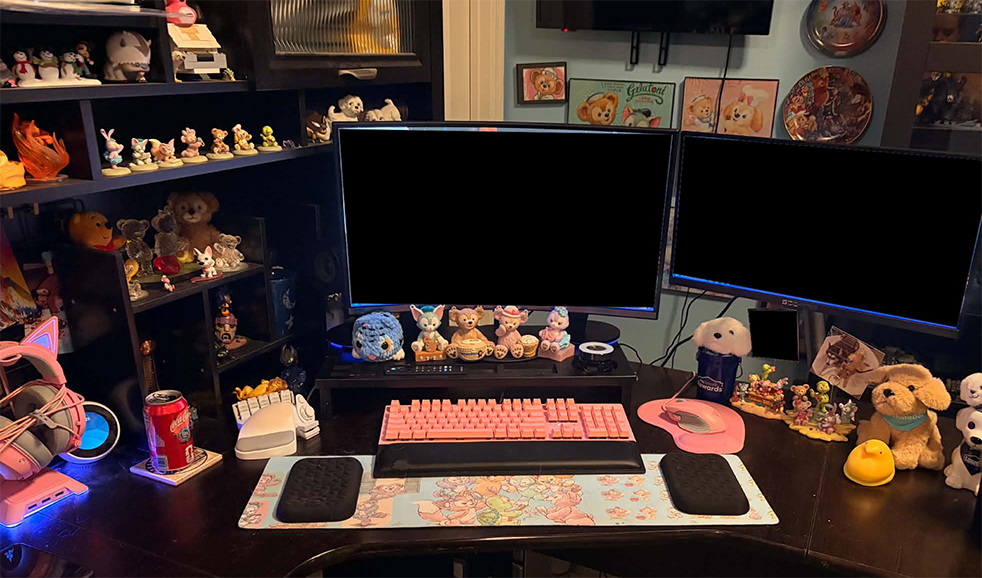
So yeah, that’s my setup. I hope I have helped you find something that could make your setup more comfortable.